Looking for an Honest ProWritingAid Review? I’ve always been a fan of Grammarly, but I considered switching to ProWritingAid for 30 days, and I personally found it incredibly helpful.
ProWritingAid is a complete toolkit that not only helps you improve your grammar but also helps you in every way to make your writing a masterpiece. It provides an in-depth analysis of your content, providing a unique perspective on your thought process and ideas, but there are some flaws as well.
So today, I’ve brought you a genuine review of ProWritingAid, detailing its features, pricing, and plans. So stay tuned to my article.
Now, without wasting any time, let’s first know the pros and cons of this that I personally experienced. Since I used Grammarly, I have a close understanding of both aspects, which are as follows.
Pros and cons of ProWritingAid
Pros:
- Time efficient – When I came to see it, I noticed that ProWritingAid takes very little time to do any work, be it suggestions or giving reports.
- Multiple suggestions – It gives multiple ways for the same task, from which you have to choose whichever suits you best.
- User-friendly – I had no problems using or understanding it the first time. Every feature and feedback is clearly presented, and the functionality is excellent.
- Color-coded system – It differentiates mistakes with 4 different colours for easy understanding.
Cons:
- No Mobile support – It does not support any mobile, be it Android or iOS.
- Restriction on limits – The free version offers very limited features and word counts.
- Can’t use Offline – It doesn’t support offline. Therefore, you should have stable internet connectivity to enjoy ProWritingAid.
- It is not very useful for students because the free plan has many restrictions, and the paid features are also not very effective for students.
Quick Review
| Parameters | Prowritingaid |
| Ease of use | A Clear and user-friendly interface, also, feature handling is not complicated. |
| Works on | Integration with Google docs, MS office Desktop App: Windows & Mac OS Browser Extension: Chrome, Edge, Firefox, Safari |
| Free limits | 500-word count limit 2 runs per report/day 10 Rephrases per day 3 Sparks per day |
| Pricing | Premium plan starting at just $10/mo, when billed yearly $120 Premium Pro plan starting at just $12/mo, when billed annually $144 |
| Best for | Most suitable for a novelist, book editor, author, blogger, academic professionals, and students |
| Ratings | G2- 4.5 out of 5 Trustpilot- 4.4 out of 5 Capterra- 4.7 out of 5 |
In my opinion, ProWritingAid is quite affordable because it offers all the features from basic to advanced at this price. It supports most of the apps, and if you are a professional writer or storyteller, then ProWritingAid is going to prove to be helpful for you.
Related: If you are a Grammarly fan, we have an exclusive deal on Grammarly.
Key Features and My Findings
Here I am going to tell you the key features of ProWritingAid, that too after testing it myself and given an honest review. Let’s move towards the very essential and basic feature of a writing tool grammar checker.
Grammar Checker
In ProWritingAid, when you paste any content, the grammar checker automatically analyzes your content deeply and highlights the grammar errors, be it spelling mistakes, punctuation, verbs, sentences, etc, in a different color so that the mistakes are easy to understand.
At the same time, it also gives suggestions and tells the reason so that you can learn from the mistakes.
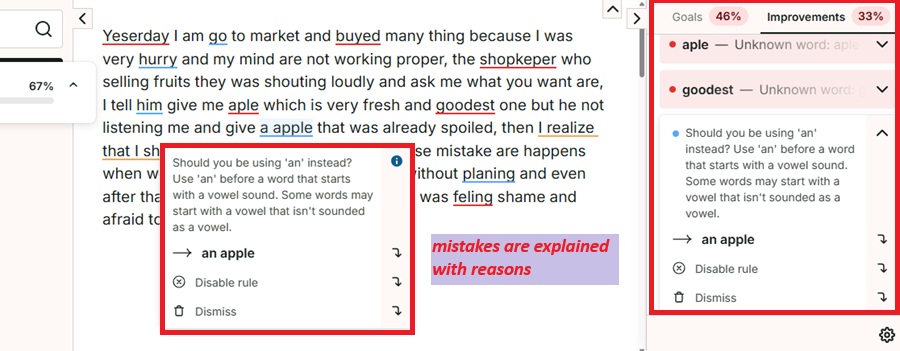
If you look, you will find this “i” button, by clicking on which it will teach you the correct verbs in detail, as I have shown in the image.
If you are a student, the color-coded system is helpful. Red indicates a spelling mistake, yellow indicates writing style (paid version), blue indicates grammar, and purple indicates converting from passive to active voice.
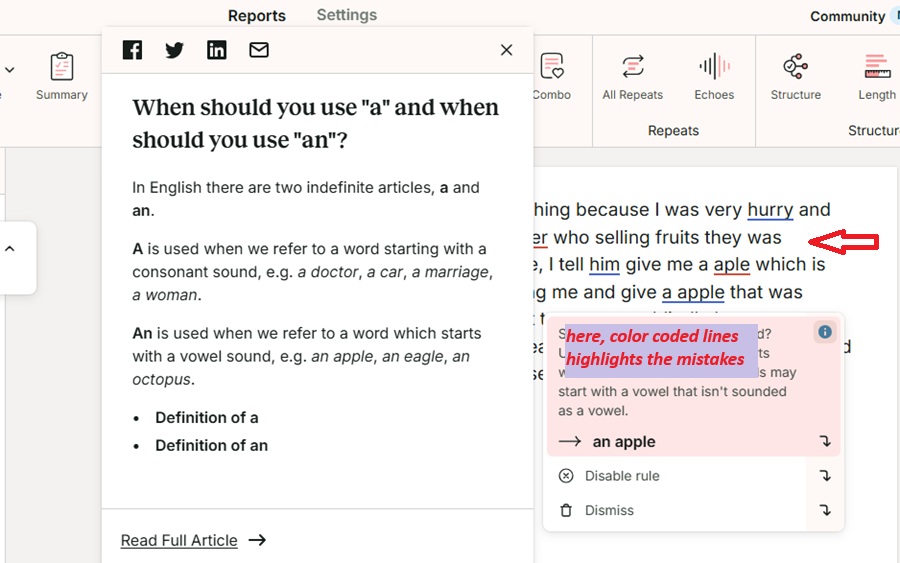
It even provides you with a personal dictionary in which you can add new words to the dictionary.
In my opinion, I liked the Grammar checker because it is as accurate and less time-consuming as Grammarly.
Paraphrasing and Rephrasing
The paraphrasing and rephrasing tools are free but come with limits. When I pasted my content, it offered several modes, such as fluency, transition, readability, third person, etc. You can select the mode you want and see sentence suggestions.
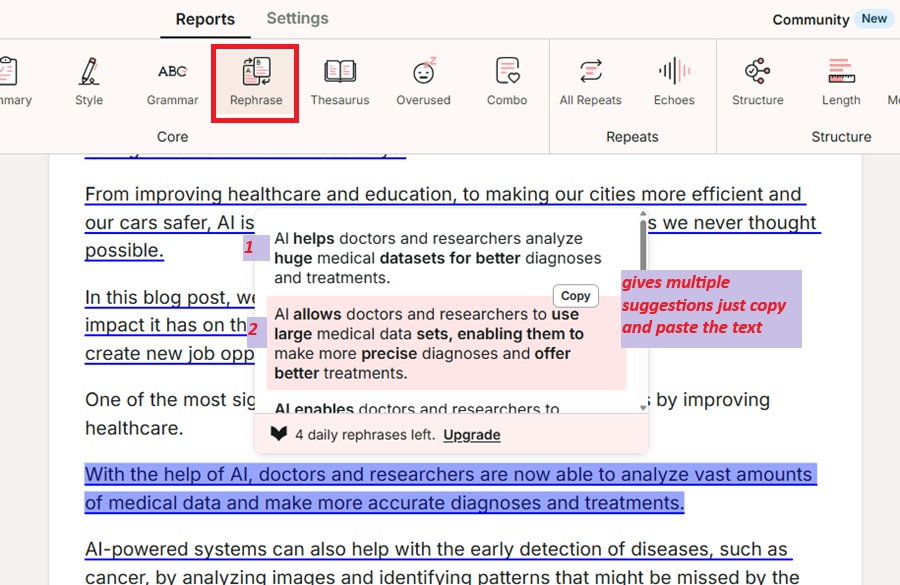
It also offers multiple suggestions, allowing you to present a single sentence in 3 to 4 different ways.
This is best if you’re an advertiser and want to create different ads for the same product.
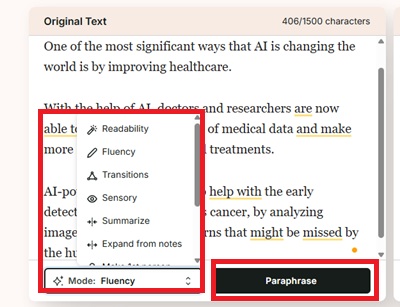
Paraphrasing not only changes synonyms but also makes more advanced changes to sentences to rewrite them.
In my opinion, I really enjoyed the paraphrasing tool. It also gives me a different perspective on my thinking.
Manuscript Analysis
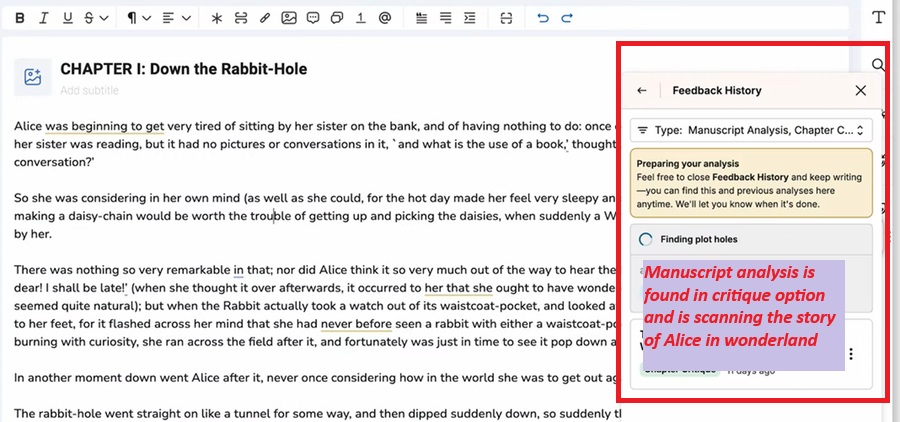
Manuscript analysis is primarily for storytellers who need to provide a detailed analysis of their stories.
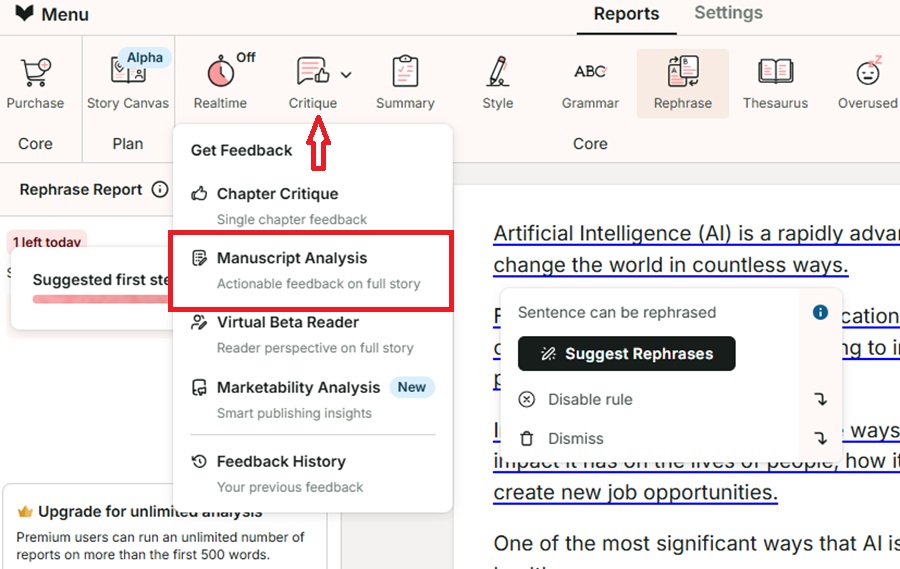
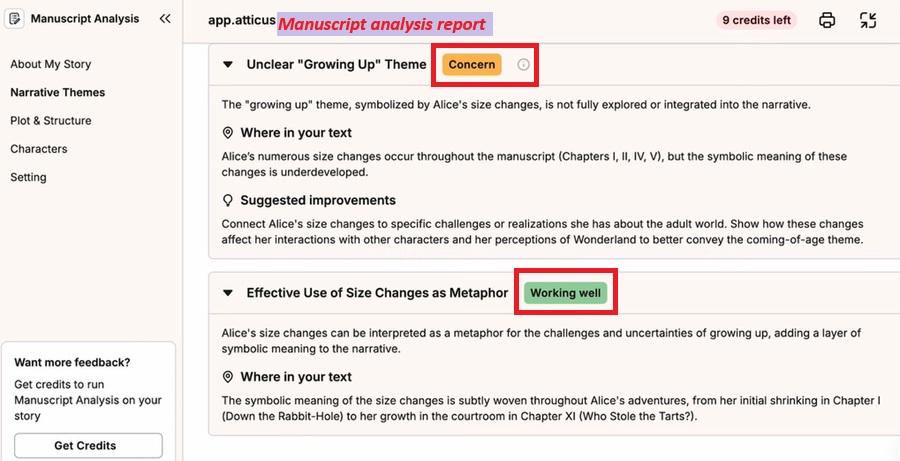
I conducted this analysis of the famous Alice in Wonderland story. The analysis report is based on five points: My story, plot and structure, characters, setting, and theme analysis.
If you see the report in the image, you will see the boxes showing major and minor concerns analyzed in the manuscript, along with suggestions for which sentences and concerns to take.
Working well is shown in green boxes if your content is accurate in every aspect.
It appears in the critique option on the extreme right, making it quite easy to do.
In my opinion, manuscript analysis is a great feature that’s very helpful for story writers. The report provides a detailed description with suggestions, so you’ll have no worries about the story.
Virtual Beta Reader
A virtual beta reader is similar to manuscript analysis. Its main goal is to tell readers in advance how the final story will appear before readers.
After the manuscript, I scanned the story in a virtual beta reader. The story report is based on four points, which include:
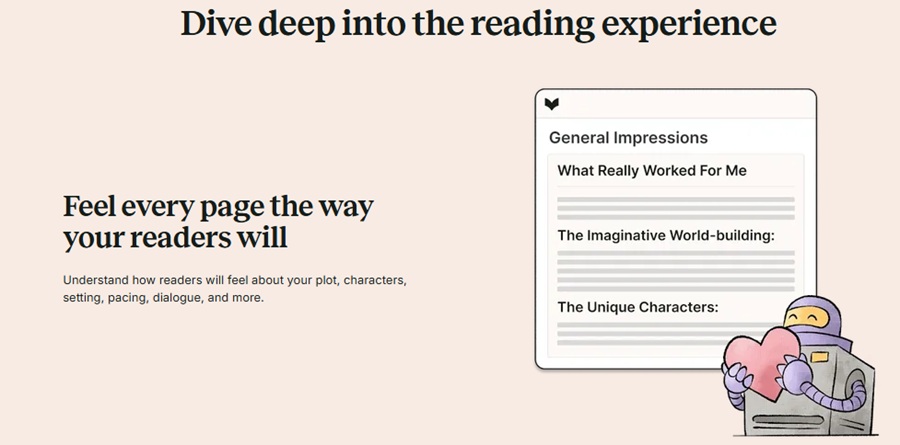
- General Impression- I figure out how my readers will feel after looking at the story’s plot, characters, and dialogue. This is a kind of impression of whether readers will like the story or not.
- Reading experience- It describes how the reader felt after reading the story. Whether it fulfilled the purpose of the story, such as excitement, anger, or fear, is based on the plot.
- Reader Insights- I figured out that it analyzes carefully and identifies favourite characters, emotional connection points in the story, and memorable moments that make a story special.
- Marketing Ideas- It gives you ideas and suggestions on what needs to be improved and what changes should be made, be it dialogue or plot, so that your story performs well in the market.
In my opinion, the virtual beta reader is a great feature that lets readers know in advance how your story will present itself and what impression it will make. This helps you determine whether the story’s purpose will be fulfilled or not.
Chapter Critique
ProWritingAid provides step-by-step features. Now that we’ve analyzed the story and know how it will impact the market, it’s time to identify areas of improvement.
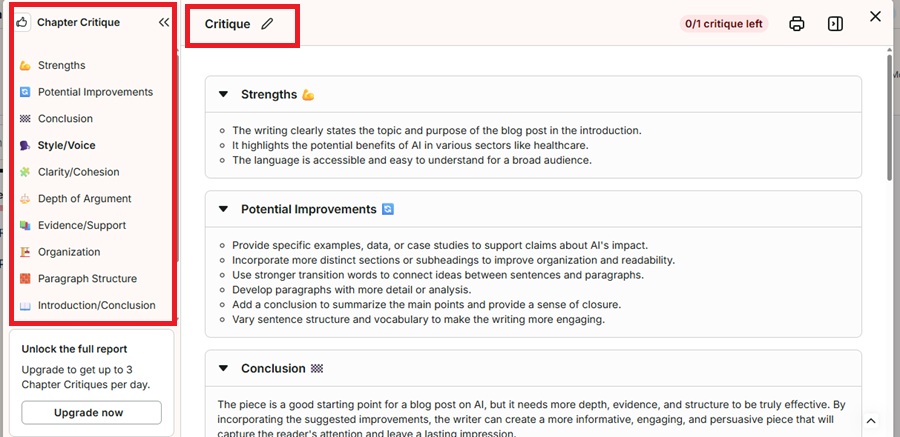
Chapter Critique highlights the story’s strengths, suggests potential improvements, and provides actionable and instant feedback.
It also tells how authentic your story sounds, what style of writing is there in the entire story.
I noticed that the chapter critique report gives strengths, potential improvements, and conclusions for free, while the rest are paid.
In my opinion, Chapter Critique will give the storyteller confidence in the story and help in proofreading by giving actionable feedback.
Sparks
If you want to improve your content, be it readability, expand, summarize, you can edit it all to your liking.
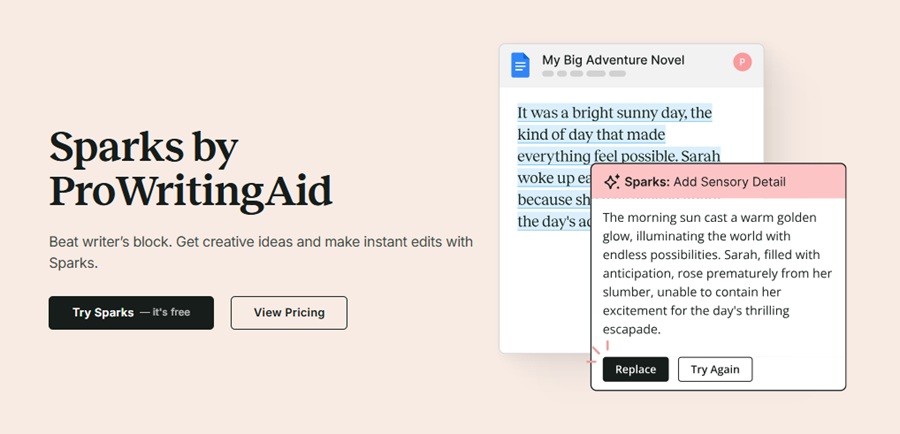
What I personally liked was that you can change the point of view of the entire content in one click, such as from first to third person, and many more.
In my opinion, Sparks is a useful tool that gives me new ideas for my content, and whenever I am blocked, Sparks also gives suggestions to continue.
Writing Reports
While I was working on the content, the writing report helped with a summary, where you can analyze your content with 25+ writing reports.
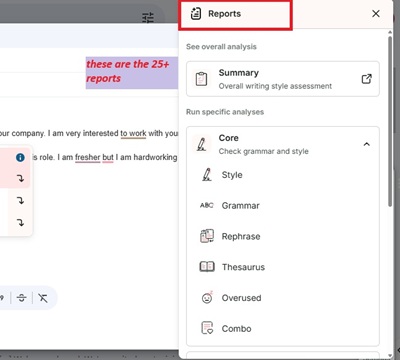
Going beyond the grammar checker, it provides improvement suggestions at an advanced level.
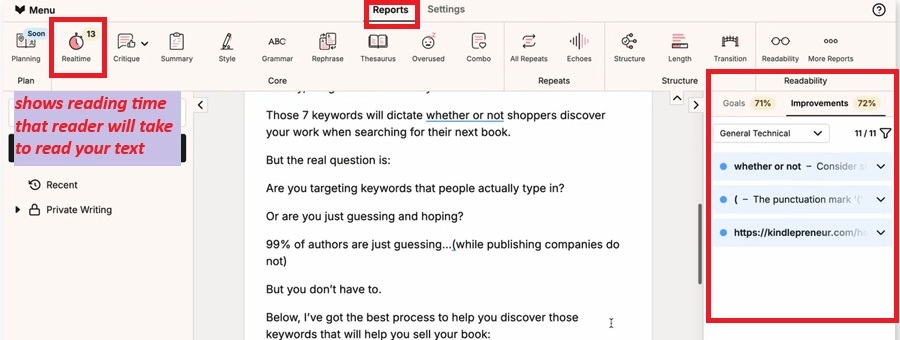
The free version only checks up to a 500-word limit and provides actionable suggestions, as shown in the image.
In my opinion, whether you are a professional writer or a student, writing reports will make your documents error-free, improve readability, and maintain fluency.
ProWritingAid Pricing (Free/paid)
ProWritingAid’s plans come in three versions: free, premium, and premium pro. The pricing options of this plan are monthly, yearly, and lifetime, which is a one-time payment plan.
| Plans | Premium | Premium Pro |
| Monthly | $20/month | $24/month |
| Yearly | $10/mo, billed yearly $120 | $12, billed yearly $144 |
| Lifetime | $399 (one-time payment) | $499 (one-time payment) |
Let’s see what features these plans are offering with limits included.
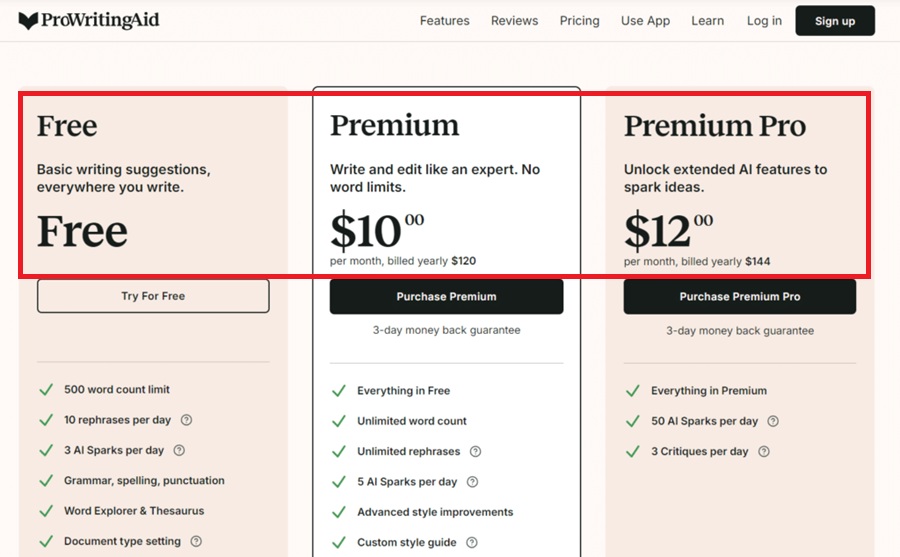
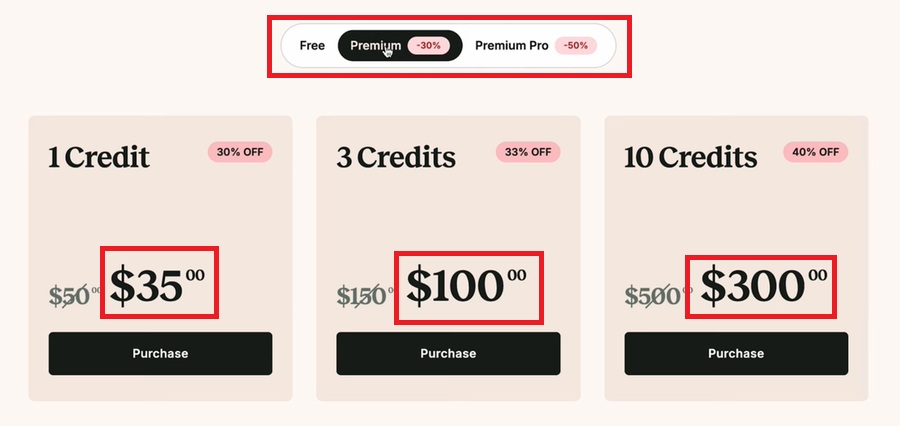
What does the free plan offer?
- It offers a 500-word count limit
- 2 run per report per day
- 10 rephrases per day
- 3 sparks per day
- Grammar, spelling, punctuation
- Ford Explorer & Thesaurus
- Document type setting
- 100% data security and privacy.
Its free plan has quite limitations as compared to Grammarly, but one good thing is that it also gives AI features to experience, which are rare to find in other apps.
So, if you are a student, then you can use the free plan.
What does the Premium plan offer? (Highly Recommended)
- Everything is Free
- Unlimited word count
- Unlimited report runs
- Unlimited Rephrases
- 5 Sparks per day
- Advanced style improvement
- Custom style guide
- 25+ writing analysis reports
- Author comparison
- Citations
- Collaboration
- Unlimited document storage
- 1 Chapter Critique per day
- Up to 40% off Story Credits
In my opinion, I highly recommend the Premium Plan, which offers monthly, yearly, and lifetime payment options. If you opt for the premium plan, you’ll get all the features with unlimited access.
The yearly plan will be more affordable than the monthly plan, as the monthly cost in the yearly plan is significantly lower.
Also, if you are an existing user and like ProWritingAid, the premium lifetime plan is best as it offers a huge saving facility, offering unlimited access with a one-time payment.
Another surprise: a 3-day money-back guarantee.
Ease Of Use:
ProWritingAid works in all the apps you want to work in, such as Google Docs, MS Office, Windows, Mac OS, and browser extensions like Chrome, Edge, Firefox, and Safari.
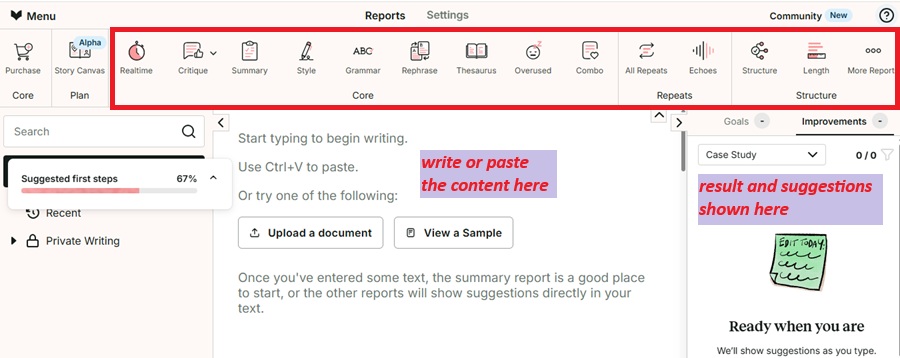
It allows you to deliver your services to you in the way you’re used to, without disrupting your work.
So, let me tell you how I used it on all these platforms, how easy it was, and what shortcomings I found during my work.
Desktop App
ProWritingAid is available on Windows and Mac OS.

For example, I installed the ProWritingAid desktop app on my Windows and opened MS Word to write a short essay on the topic: Artificial Intelligence- A Boon or Curse?
As I wrote this article, I started receiving grammar errors and style guide suggestions in real time.
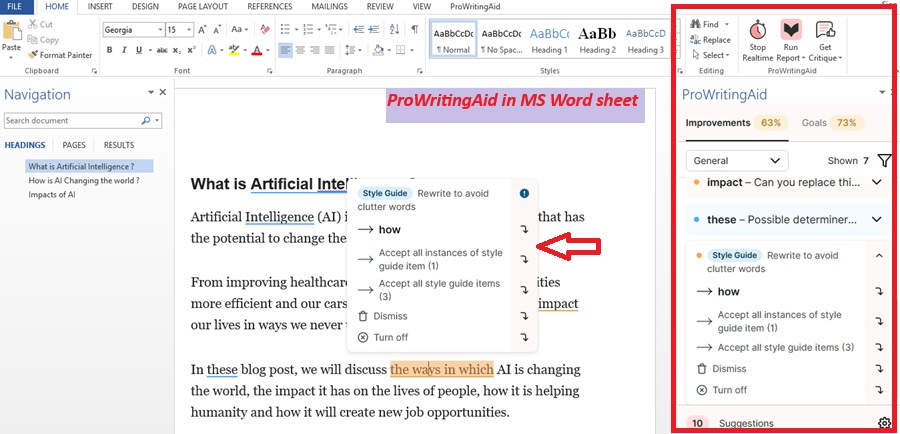
After creating the entire article, there’s a full ProWritingAid section in the right corner where you can run reports.
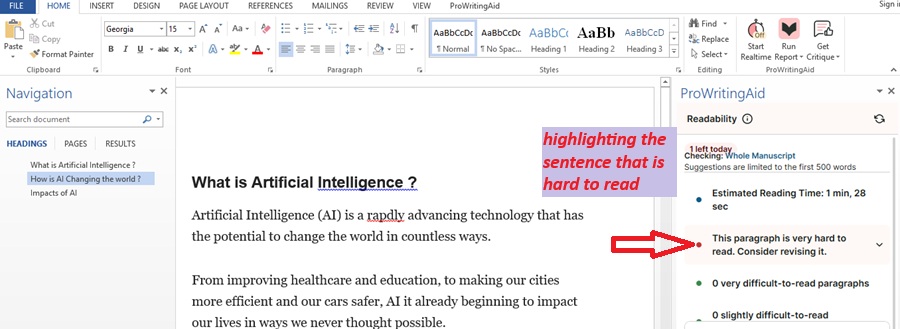
There are 25+ writing reports, and you can also use Critique and analysis.
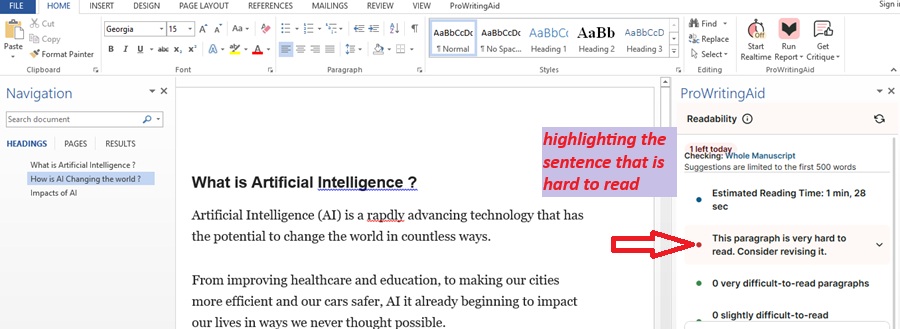
It’s quite easy; you don’t need to search or do anything yourself; it automatically starts working in the background.
All the changes you make after installing the desktop app will be automatically saved in the computer’s Documents folder.
I’m showing you the result through the images. It was very helpful, and in my opinion, it transforms MS Word into an advanced tool.
My take: As per the students, it's quite helpful to install the desktop app. I found it very useful and very user-friendly.
Google Docs
ProWritingAid works perfectly in Google Docs, as if it were part of Google Docs itself. As soon as you add it to Google Docs, it will easily suggest improvements.
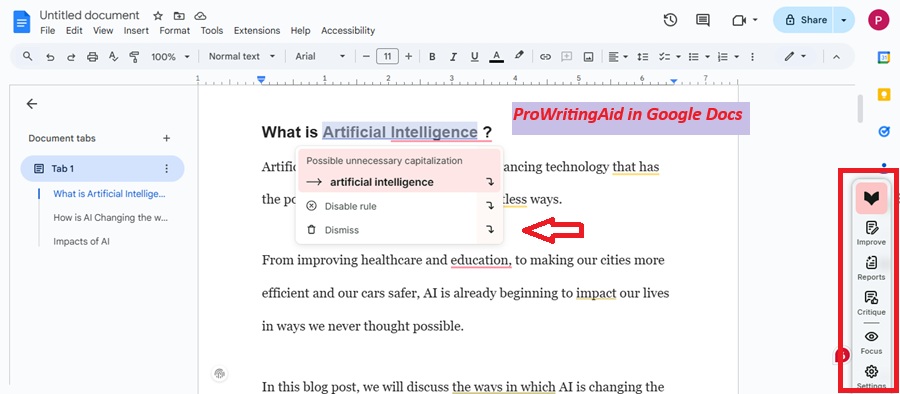
For example, I wrote the same article on Artificial Intelligence and ran a report, which suggested a readability score that the highlighted sentence was hard to read.
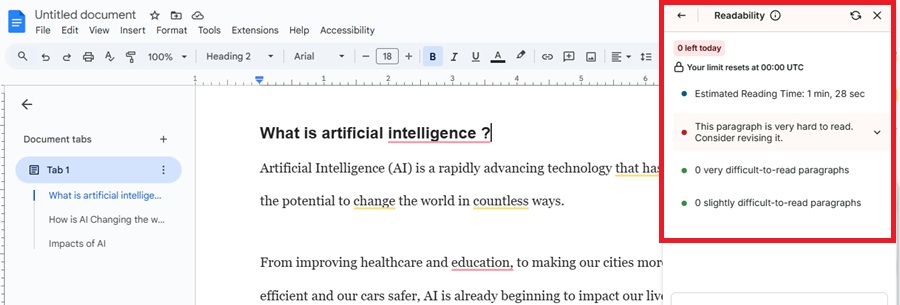
The grammar checker and all other features, including critique and manuscript analysis, will do the job.
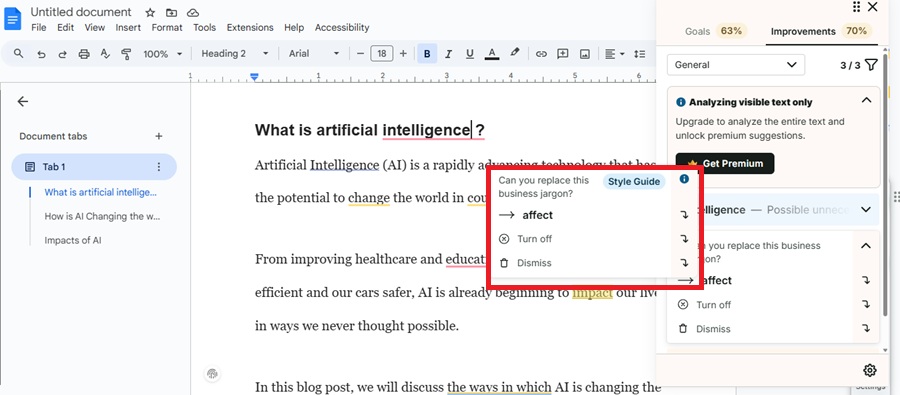
My Take: I didn't have any problems with Google Docs, and it easily styles, improves, and deeply analyzes my content.
Browser extension (Chrome)
The ProWritingAid browser extension is available in Chrome, Edge, and Safari. And Firefox.

Today, I’ll show you how easy it is to use ProwritingAid in Gmail. I used its browser extension on Chrome.
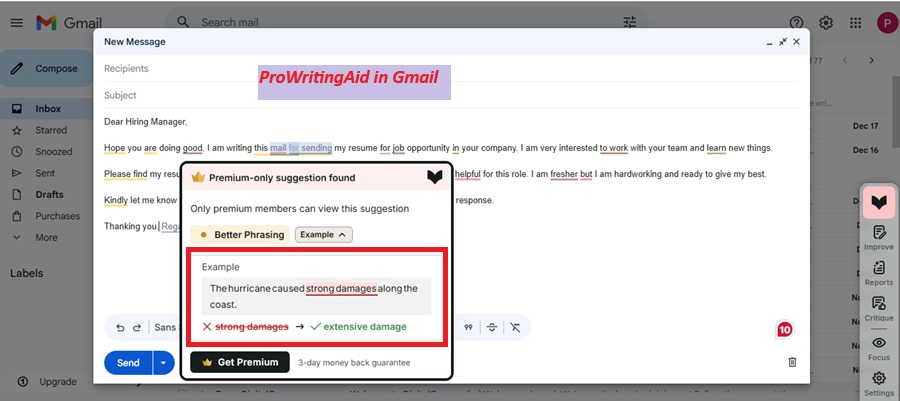
For example, I texted a message to send my resume directly to my Gmail account, and thanks to ProWritingAid for helping me to correct the mistakes in detail in real time.
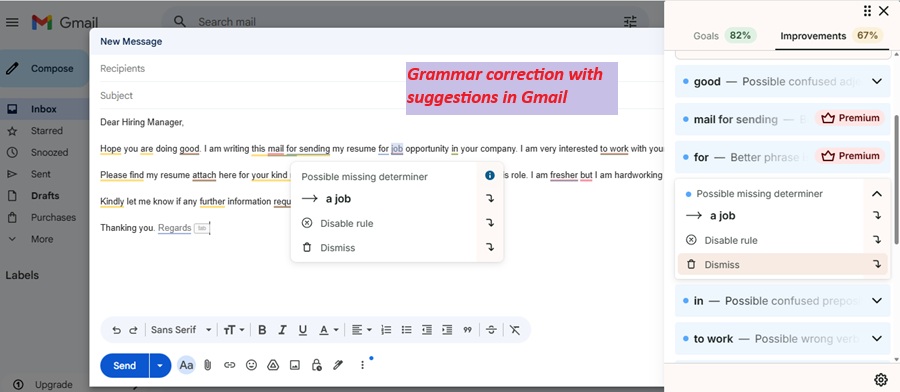
In this, you can change your writing modes through the report. I rephrased my sentences to make my message look more polite.
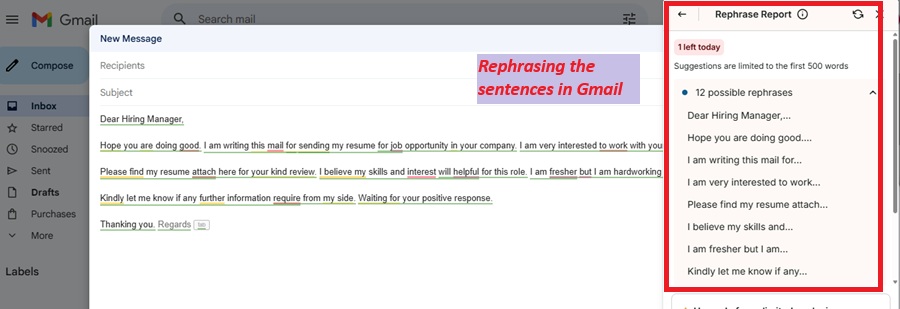
My Take: Prowritingaid worked great for my Gmail. I did not feel any discomfort from any side and silently used all these tools in the background, and I got to see straightforward suggestions that actually improved the mail.
Drawback I found
The only drawback I found was that it doesn’t support mobile keyboard apps, making it difficult to use on mobile.
If you use Gmail, Google Docs, or other apps, you won’t see the mobile facility on this tool.
I you want a writing tool with advanced features that also offers mobile support, I recommend Grammarly.
My 30-Day Only ProWritingAid Experience
As I told you at the beginning, I’ve used Grammarly for most of my writing career, and I’m a Grammarly fan. But I’m always eager to try new tools.
So, I quit all other apps for 30 days and used only ProWritingAid.
I personally enjoyed it so much that I decided to write a review to give other writers a genuine review.
ProWritingAid has been incredibly helpful, and I can say it’s just a good as Grammarly. My reason for telling you this is what I liked and what I missed during these 30 days.
So let’s find out.
What I liked the most
- First of all, I liked its pricing. The lifetime plan is a great initiative if you’re a fan of ProWritingAid.The one-time payment works out to be much cheaper on a monthly basis, making it affordable and a gift for permanent users.
- Style guide and paraphraser are my favourite features since they pop up and suggest multiple options to refer to.
For example, if you’re working on advertising a product, Paraphraser gives you multiple styles of sentences that you can present differently on Gmail, LinkedIn, and Facebook with just one click.
- It’s perfect for story writers and professional writers, with tools like manuscript analysis that I rarely see anywhere else. I’ve even upgraded my storytelling skills in 30 days, which is an amazing experience.
What I missed
- I really missed the mobile app support that Grammarly offers, as desktops and mobiles are now working together.
- ProWritingAid isn’t designed for students, as Grammarly offers features like unlimited access even in the free version. It offers all the basic features a student might need.
Is ProWritingAid better than a human editor?
ProWritingAid is an AI-powered writing tool that is made to help human editors and not to replace them.
A human brain can do an unlimited thought process, but many times, while writing, we start thinking from one angle only, and thus, the content becomes blank.
This is where the ProWritingAid toolkit comes in handy in which includes tools like a style guide, a paraphraser, 25+ writing reports, citation, critique, and does deep analysis of our content and gives us multiple options for the same sentence, different modes, and writing styles.
Due to this, human editors also brainstorm and develop new ideas, and the readability of the content increases.
Is ProWritingAid worth it?
Yes, of course. Whether you’re a storyteller, professional writer, business writer, or even a student, ProWritingAid is a great tool.
If you create long-term content, the “All Repeat” report works best. It has excellent style correction features, offering 25+ writing reports.
It’s a flexible tool that offers content modes like emotional, polite, casual, etc.
And, it is value for money because it offers affordable prices. It offers AI tools in the free version, with limitations, which is impressive.
Conclusion
Now that I have reached the end of the article, I would like to tell you that I have tried to explain every aspect in detail, be it price, features, and shown that the tools were tested by me with images, and also given the best recommendation as per my experience, along with pros and cons.
I hope you will find this article helpful, and you will definitely try ProWritingAid.
FAQs
Does ProWritingAid cost money?
Yes, ProWritingAid offers an affordable range of plans and pricing. Its Premium plan starts from just $10/month when billed annually $120, and the Premium Pro plan starts from just $12/month when billed annually $144.
What is ProWritingAid used for?
ProWritingAid is used to remove grammatical errors from the content, to maintain the readability and fluency of the content, and to make the content extraordinary with the help of a style guide, modes, and writing reports.
Which is better, Grammarly or ProWritingAid?
Grammarly and ProWritingAid are both writing tools. While Grammarly is known for its simple everyday use that provides essential writing features and the best grammar checker, ProWritingAid specializes in long-form content, story writing, and in-depth content analysis.

About the Author:
Hi All, This is Renu. A Bsc. B.Ed. ex principal with over 45 years of experience. I have worked for renowned government school in India. During my tenure, I have helped in NCERT syllabus updations, written several books in english English literature.
Post my retirement, I have been teaching English Language, translations and content creations to the students across the world. Have created several typing, content writing and translation related courses on this website.
Not very active on social media but you can connect me on LinkedIn.