Looking for a detailed Grammarly vs ProwritingAid review? Look no further, This article is one of the indepth study that helps you choose the right one.
Grammarly is a writing tool specially designed to eliminate grammar and spelling mistakes. But over time, Grammarly has updated itself and provided all the essential tools required for writing, along with adding AI tools and detection tools such as plagiarism and AI detection.
What is coming now is extraordinary. Grammarly is soon becoming Superhuman. That is why Grammarly is called an all-in-one writing assistant.
ProWritingAid is also an AI-powered tool specially designed to turn writing into a masterpiece. It provides an in-depth analysis of long-form content and stories, generating reports and providing suggestions for story wins and losses.
It also offers a plagiarism checker as a detection tool.
Quick Comparison (At a Glance)
| Parameters | Grammarly | ProWritingAid |
| Specialized for | Grammar and spell check, punctuation, paraphrase, clarity, and tone suggestions. | Writing analysis, grammar, and spell check, rephrasing, reports, and improving writing |
| Grammar Checker | ✅ | ✅ |
| AI tools | AI grader, citation finder, expert review, readers’ reaction, humanizer, proofreader, paraphrase, AI detector, plagiarism checker | Sparks, chapter critique, manuscript analysis, virtual beta reader, rephrase tool, plagiarism checker |
| Plagiarism Checker | ✅ | ✅ |
| Language support | English, Spanish, French, Portuguese, German, and Italian | Only supports English |
| AI Detector | ✅ | ❎ |
| Integration | Google Docs, MS Office, Apple Mail, Gmail Desktop Apps: Windows & Mac OS Browser Extension: Chrome, Safari, Firefox, Edge | Google Docs, MS Office Desktop Apps: Windows & Mac OS Browser Extension: Chrome, Edge, Firefox, Safari |
| Accuracy | ⭐⭐⭐⭐⭐ out of 5 | ⭐⭐⭐⭐ out of 5 |
| Mobile support | ✅ supports both Android & iOS | ❎ |
| Ideal for | Daily, short content, and professional writing | Long-form content, story writing. |
| Pricing | Premium plan starts at just $10 per month Premium Pro plan starts at just $12 per month | Premium Pro plan starts at just $12 per month Premium plan starts at just $10 per month |
| Customer support | Chatbox, Support ticket | Chatbox, FAQs |
| Ratings | G2: 4.7 out of 5 Capterra: 4.7 out of 5 | G2: 4.5 out of 5 Capterra: 4.7 out of 5 |
Table of Contents
What are Grammarly and ProWritingAid Designed For?
Both are writing tools that work as writing assistants. They not only correct grammatical errors but also solve most of the problems that arise in writing.
However, their working methods are different and are designed for different tasks, which we can also call their specialties.
Grammarly is designed for short-form, academic, and professional writing. It’s not only helpful for individuals but also provides features for team collaboration.
These features are common to both individual and team members.
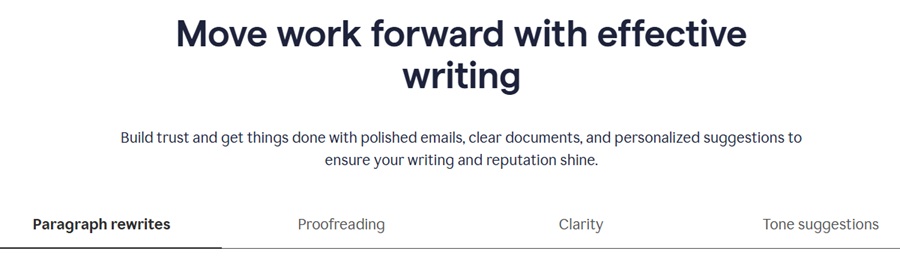
For example, if you’re a member of an academic institute or business organization, the team plan includes all the essential and advanced tools that give you the flexibility to work together. That’s why Grammarly is best for everyday and professional work.
If you install Grammarly’s browser extension, you will notice that it will be available to help you everywhere, like if I am sending a resume in Gmail, it automatically gives suggestions, which you can directly message without cross-checking.
ProWritingAid is designed for detailed report analysis, long-form, and story writing. If you are confused about your story, ProWritingAid will provide clarity, fluency, and readability.
It will perform an in-depth scan using the manuscript analysis provided in the critique tool, create a report, and provide actionable suggestions.
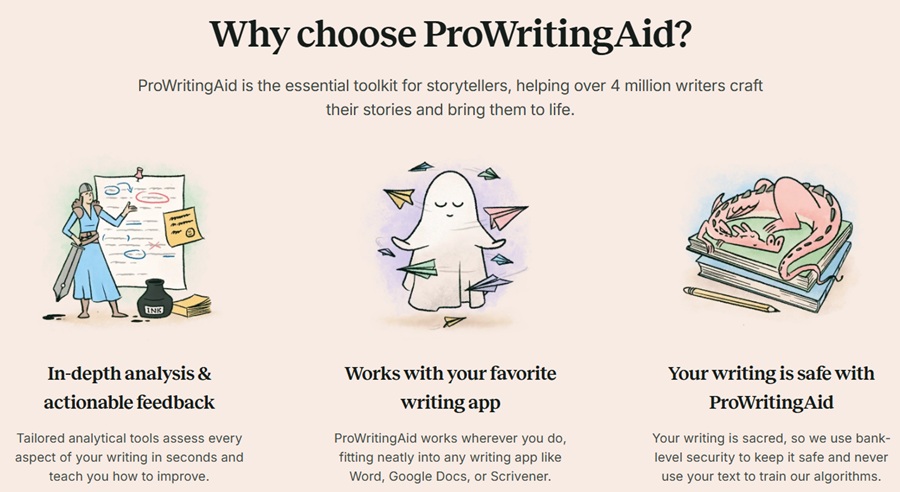
You’ll also get access to readers’ advance reactions with a virtual beta reader. Features like paraphrase and rephrase improve sentences, and a style guide enhances your content.
It provides 25+ reports, so you can understand that ProWritingAid is for serious writers who create long-form content.
Grammarly’s Key Features
Let’s see what the features Grammarly and ProWritingAid offer so that it is easy for us to compare prices according to the features they offer.
I will first share the key features of Grammarly, and after that, ProwritingAid in the next heading.
Grammar and Spell Checker
First and foremost, Grammarly helps you improve your spelling errors, grammar, and basic punctuation issues.
I ran Grammarly in Google Docs, and it provided suggestions for spelling corrections, suggested correct wording, rephrasing, punctuation problems, and text improvements.
It also provided a reason for learning during corrections. I have shown the same in the image.

And with a single click, when you press the “accept” button, the content is corrected in real time.
Rephraser
It instantly rewrites your sentence. It gives you the option to change it to a version that suggests rephrasing the full sentence or suggesting the appropriate words. I have shown this to you in the image.
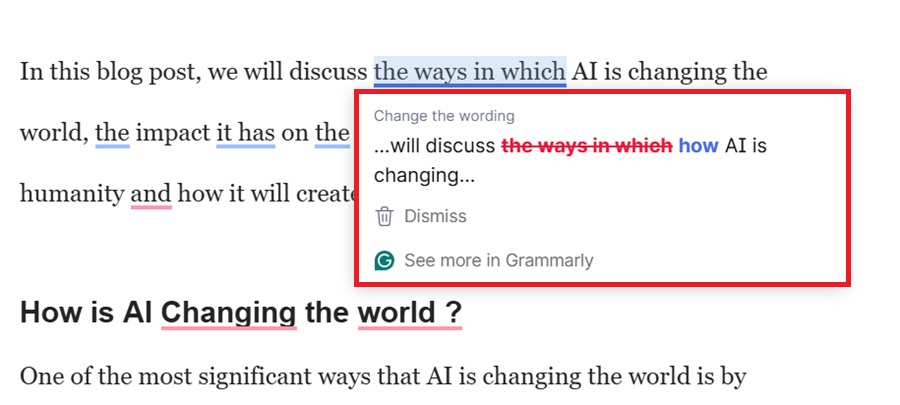
You can also dismiss the suggested version if you want.
Proofreading
It detects punctuations, grammar errors, and unnecessary words in your sentences and suggests correct words and other necessary corrections. It proofreads my whole paragraph and corrects all the mistakes.
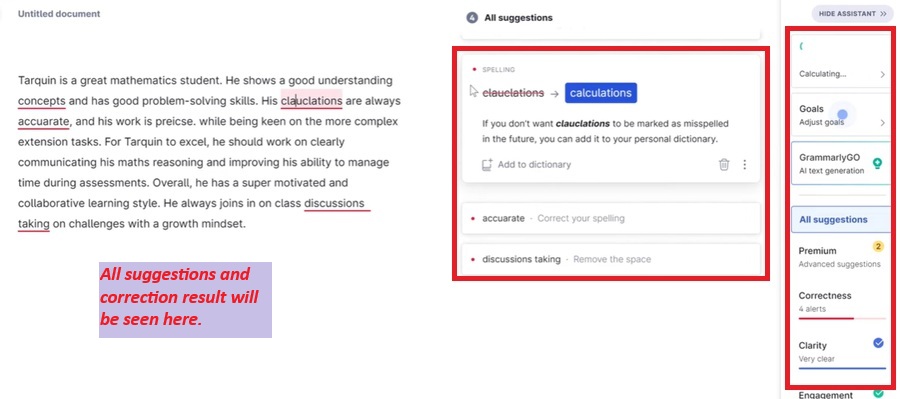
It proofreads all of this before sharing your content publicly.
Tone Suggestion
It comes under the Pro plan and uses tone detection and writing style to suggest the appropriate tones for your content, or you can adjust the tone yourself.
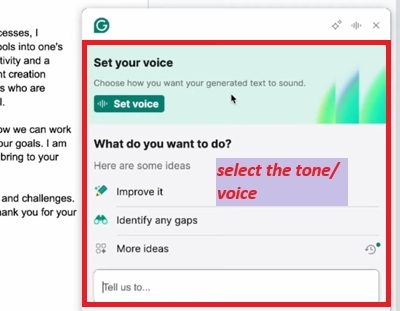
After setting the tone, your sentence will be rephrased according to your selected tone style.

You can see here that the result has come by rephrasing my message in a confident and empathetic tone.

Clarity
It comes under the Pro plan. It provides suggestions for improving your content. You can use the suggested version, as shown in the image.
This gives the sentence a correct version without making any intentional changes.
ProWritingAid Key Features
Let us now know the features of ProWritingAid.
Grammar and Spell Checker
The grammar checker analyzes the content and suggests correct spelling, punctuation, and verbs, and also suggests reasons, keeping the learning perspective in mind.

Paraphrasing
If you’re an advertiser, it will provide multiple suggestions for your sentences and paragraphs, allowing you to choose from them.
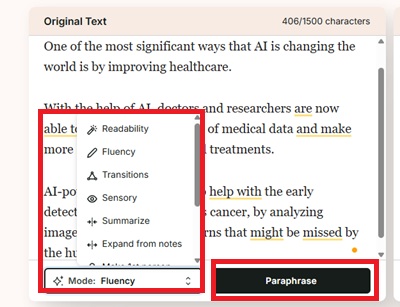
This allows you to use different sentences for your different platforms.
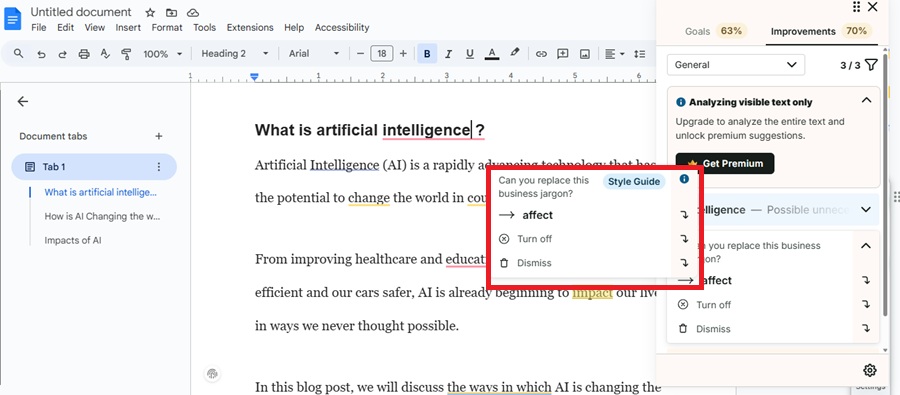
Word Suggestions
Here, it gives a much better and relevant word suggestion that is to be replaced by irrelevant words. I’ve shown it in an image here.
It also gives you the option to add a new word to your personal dictionary.
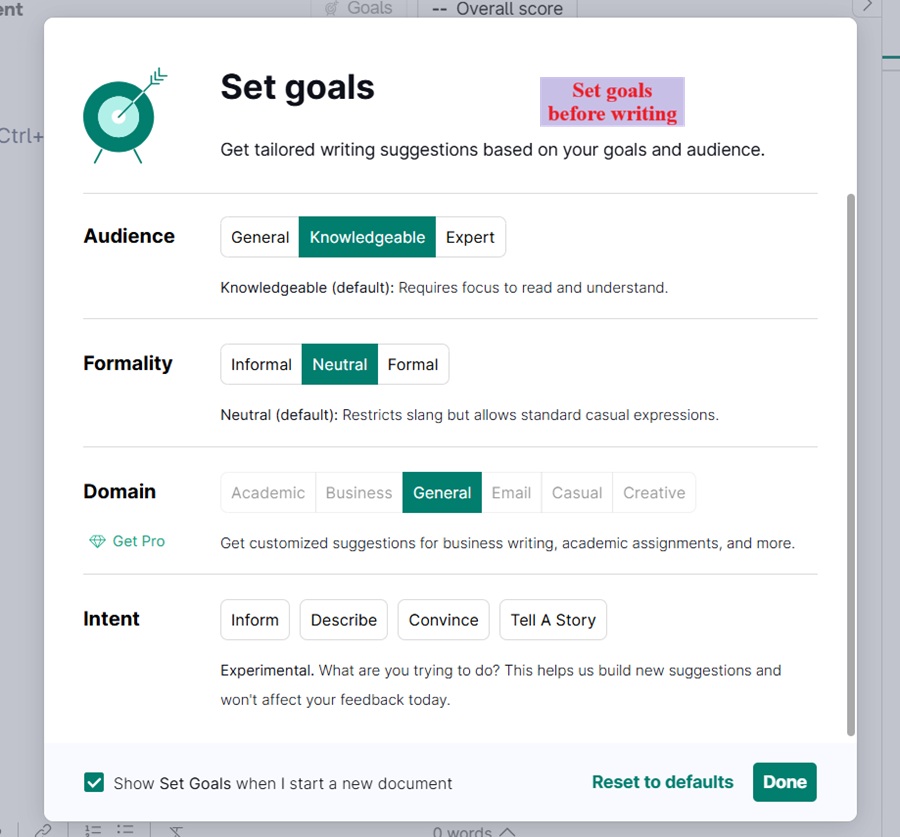
Style Guide
A style guide allows you to set your writing style, allowing you to set the tone or style of your content according to your choice. For example, if you want to set your content in a creative style, then it will transform its language accordingly.
AI-Powered Tools That Grammarly and ProWritingAid Offer
Grammarly and ProWritingAid offer advanced AI tools that help ensure your writing looks creative and authentic. Let’s see what those tools are.
Grammarly AI Tools
Grammarly offers a variety of tools that level up your writing and make it easy from start to finish.
1. AI Grader and Citation Finder
If you’re a student or academic professional, the AI grader and citation finder is one of the best AI tools.

AI Grader is an assignment evaluation tool that deeply analyzes documents, corrects grammatical errors, provides instant feedback, and predicts grades in advance.
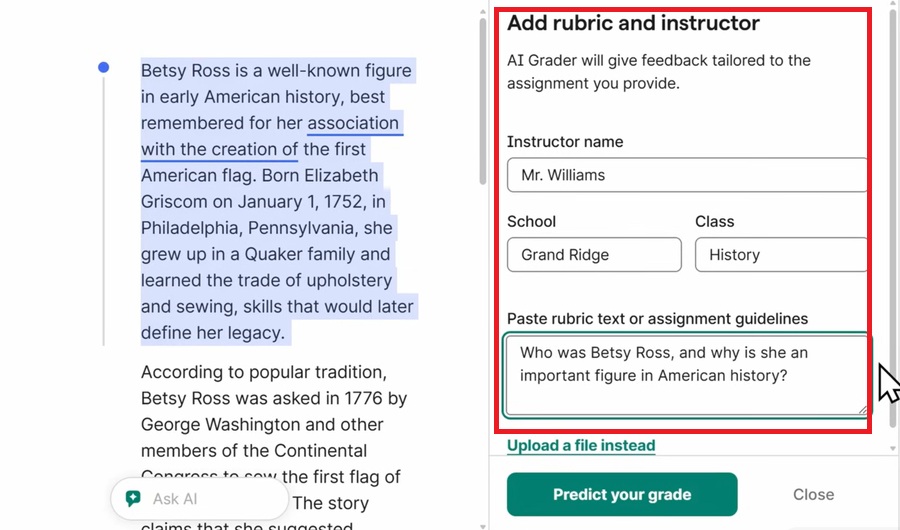
Whereas, citation finder verifies the source presented in your documents and helps you generate citations in APA, MLA, and Chicago style format.
2. Reader Reactions
Reader reactions tell in advance the strength of the document, what you missed, and what the reader’s reaction will be.

Reader Reactions is performed to know the reaction and result in advance about how the document will land in the market.
3. Humanizer
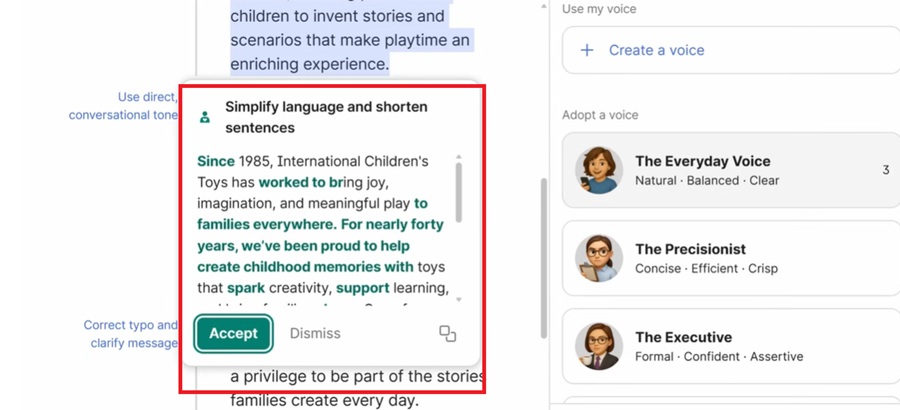
This makes your content look more genuine, simple, and natural. This involves selecting and humanizing your text. This doesn’t change the intent of your text, but rather makes it more natural.

4. AI Detector and Plagiarism Checker
If you scan your content with the AI detector and Plagiarism checker after completing your content, you can protect your content from accidental plagiarism and AI-generated text.
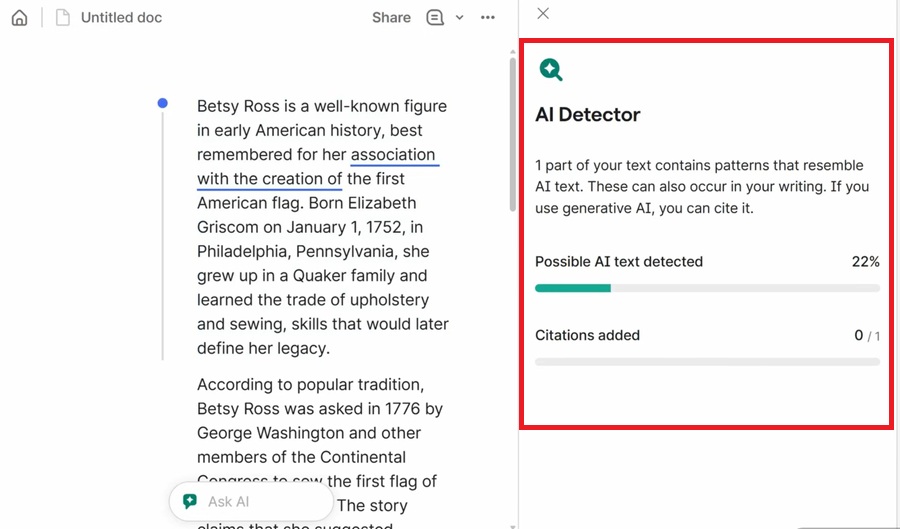
It detects plagiarism in the content, identifies the exact source from where it has been copied, and also catches AI-generated text.
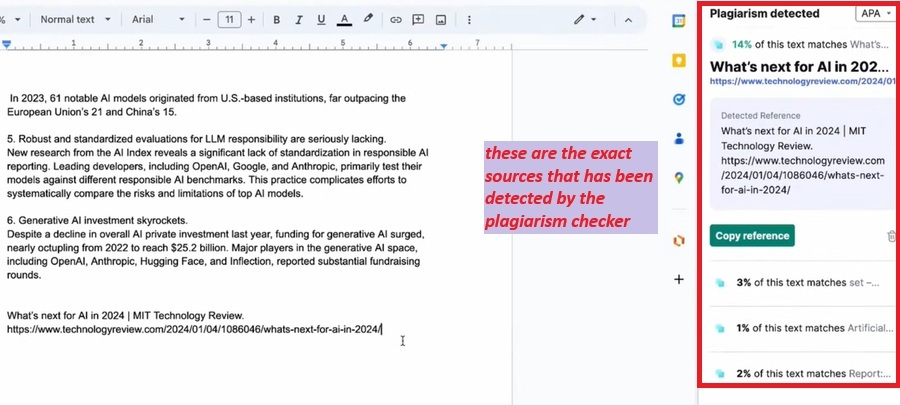
We do not claim that it will be 100% accurate, but it helps in maintaining the authenticity of the content.
ProWritingAid AI Tools
ProWritingAid’s AI tools are designed for story writing and in-depth analysis. If used step by step, it will create creative content from start to finish.
1. Manuscript Analysis and Virtual Beta Reader
If you are a novel writer or a story writer, you can scan your documents to get the feedback to improve the overall performance, help in correcting grammar, give actionable suggestions, and predict the reader’s reaction in advance.
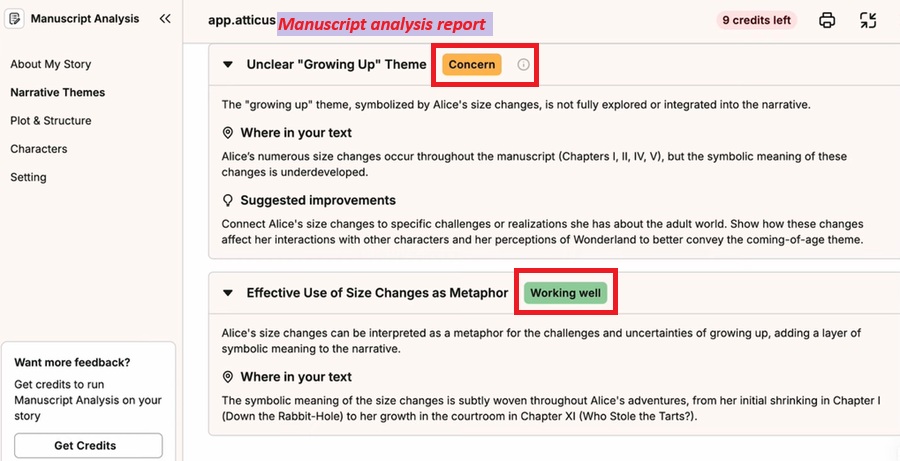
It checks your story readability, overused words, writing styles, and readers’ reactions in advance.
2. Chapter Critique and Marketability Analysis
If you want to know your story’s strength and overall potential improvements, then a chapter critique is the best tool. It focuses on the style of writing, improving impact, and fluency.
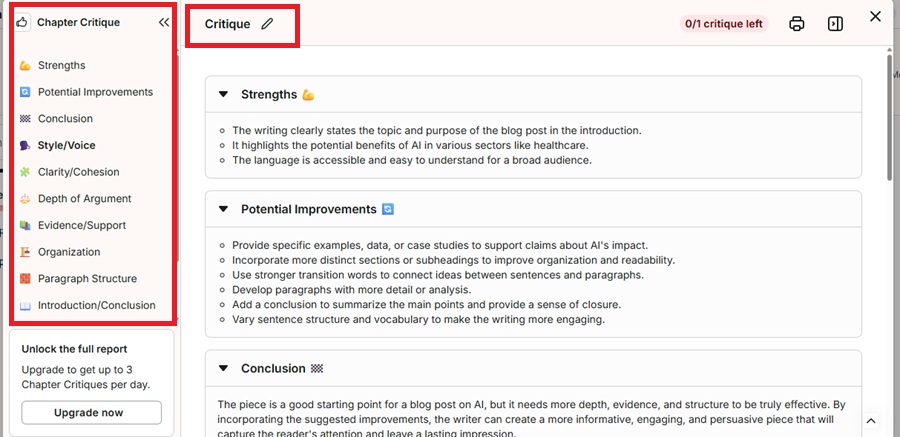
Finally, the document needs marketability analysis to know the latest trends, suggestions, and actionable feedback.
3. Sparks
If you need instant ideas and clarity in your thoughts, then Sparks is here to give you suggestions to improve sentences, text, and adjust the tones, such as friendly, casual, readability, fluency, etc.
So, if you are a student or a beginner, then it will be a good writing assistant for you to improve and correct your text and adjust your tone.
My Take: Grammarly AI tools are paid, whereas ProWritingAid gives AI tools in a free version, but with limits.
Ease of Use (Grammarly vs ProWritingAid)
Let us know how easy and convenient it is to use both these tools. For your understanding, I have shown you this usability through images.
1. Interface
The first thing that we see is the interface. I always want a clear interface so that even new users don’t get confused while using it. Let’s take a look at and compare both apps in terms of interface.
Grammarly

Grammarly’s interface is very clean and easy to understand, so even if you are a new user, you don’t need a tutorial; everything is easy to figure out.
Mistakes are highlighted in real time as you type, and suggestions also pop up immediately.
ProWritingAid
ProWritingAid’s interface is clean, but a bit complicated to understand at first. You’ll see different segments, which can take time to figure out the working of all the features.
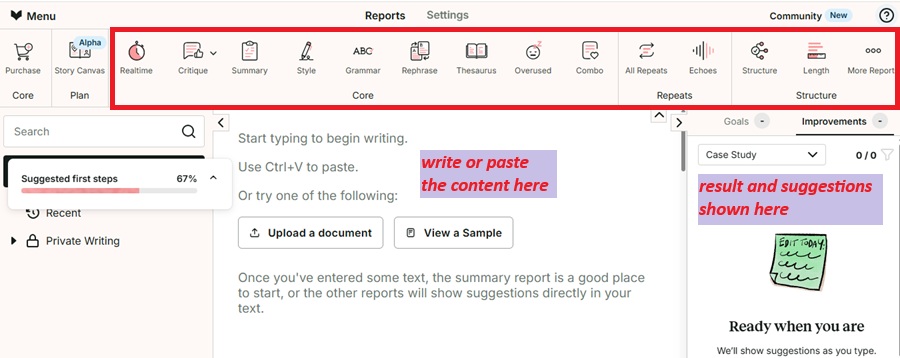
My Take: Grammarly’s interface is quite clear, user-friendly, and easy to understand, even for new users, while ProWritingAid's interface is also very clear, and the best part is its way of giving suggestions is quite understandable.
2. Works On
I would always recommend installing a browser extension if you want to make full use of any tool. So, let’s see the functionality of the browser extension of both these tools.
Desktop App
Grammarly is available on Mac OS and Windows.
I’ve always used Grammarly. Once installed on Windows, it will follow you wherever you work. It provides real-time grammar correction, sentence rephrasing, correct word recommendations, and punctuation suggestions, even for free users.
I have shown you how Grammarly works on MS Word, and my experience was great. It silently follows me everywhere and provides me with suggestions in real time with no lag at all.

Here are the results of showing me the suggestions and correcting my mistakes.

You’ll find the tone analyzer, advanced AI tools, and all together in the right column, providing actionable suggestions with just one click.
ProWritingAid is available on Mac OS and Windows.
I have tried ProWritingAid in MS Word and would like to show this through images. In this, whenever mistakes occur while writing, grammar errors get highlighted at the same time and suggestions are also given at the same time.
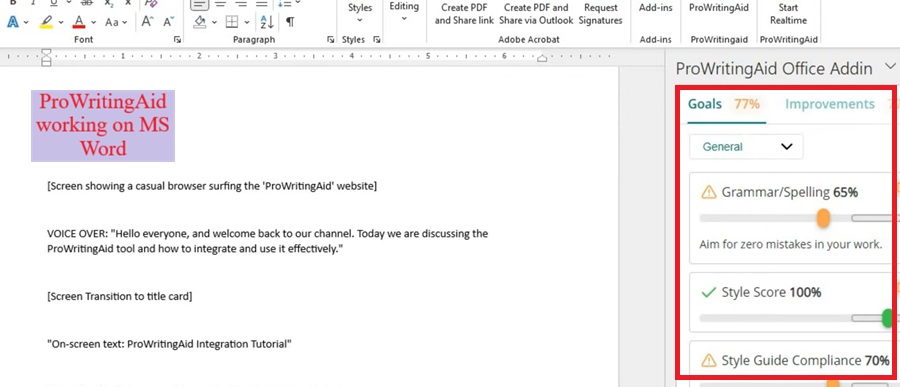
Here, the suggestions and improvements are shown in the images. But sometimes it lags in between, and I have faced trouble working.
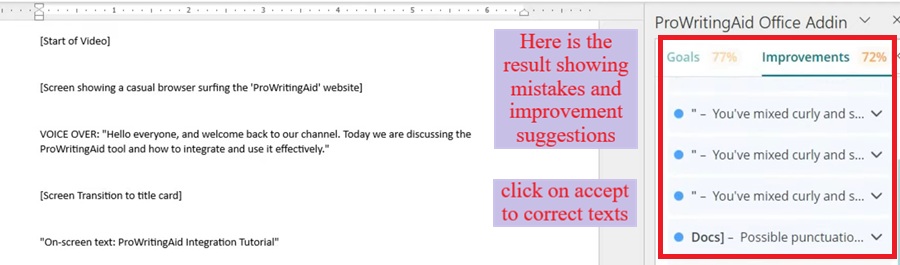

You will also get to see writing styles, tone adjuster, and 25+ writing reports. If you are a free user, then there is a limit to this, and if you take the premium plan, then all these are available with unlimited access.
My Take: Both work well, but Grammarly’s suggestions are proper and support it without any lag.
Browser Extension
I have used both the apps on Gmail and have given my opinion on both of them.
Grammarly supports the most used and popular Chrome, Safari, Firefox, and Edge.
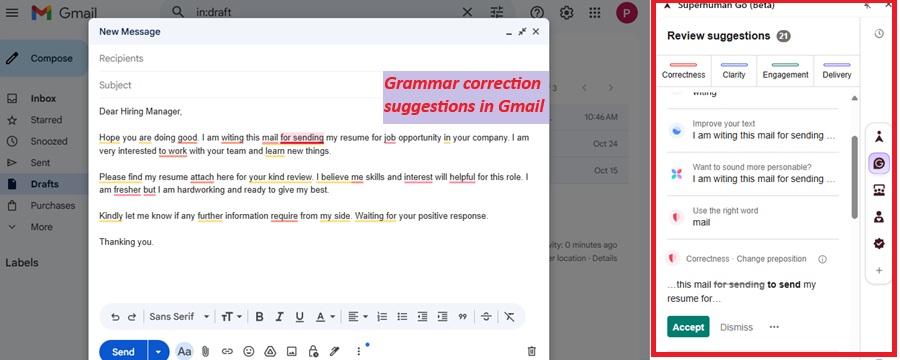
After installing Grammarly’s browser extension, it works in all apps. It works silently in the background and keeps your work running smoothly without you even noticing.
Wherever I’ve worked, be it on Gmail, Facebook, or Google Docs, it’s helped me.

ProWritingAid also supports Chrome, Safari, Firefox, and Edge.
ProWritingAid works well. It also works silently in the background, which is commendable.

But sometimes, when too many apps are opened with it, the browser slows down typing speed or starts freezing, which I found to be a problem.

My Take: Grammarly is much better at handling all apps, and there is no problem with hanging.
Mobile Support
Grammarly mobile keyboard supports both Android and iOS. The Grammarly keyboard checks grammar and spelling, and also suggests punctuation, verbs, and sentence rephrasing.
It only supports the English language, and you need a stable internet connection.
ProWritingAid does not support Mobile.
My Take: Grammarly takes the lead here with mobile support, as desktop and mobile work together these days. Accounts are linked during work, so you can work on both.
Pricing Comparison – Which Tool is Worth Paying For?
Grammarly Pro plan has replaced the premium and business plans. That’s why the Pro plan is worth taking, which is both for individuals as well as teams, is best when it gives you unlimited access to all the tools, and it will cost you much cheaper on a monthly basis if billed yearly.
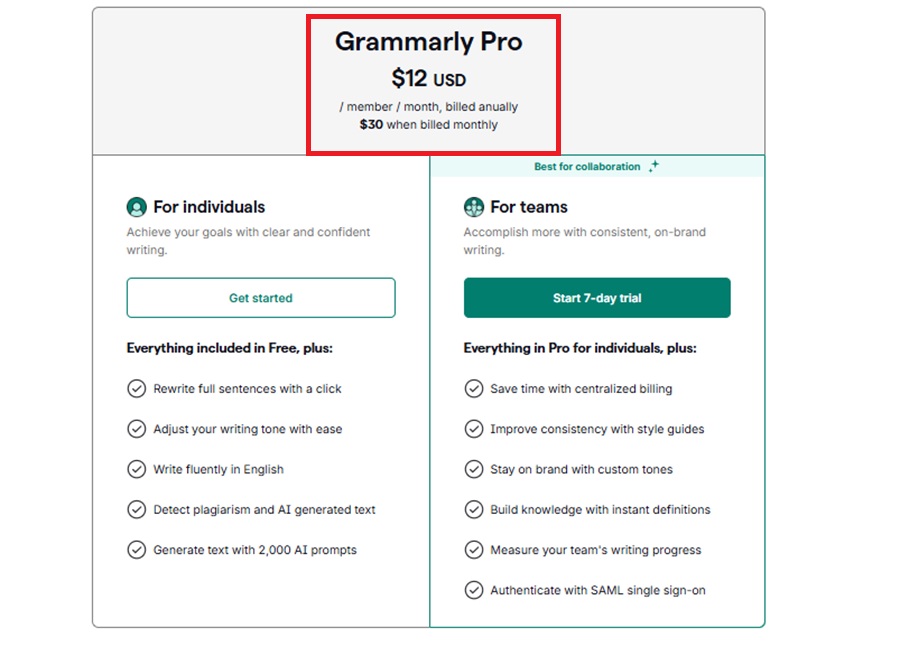
You can enjoy the features and tools of both plans with unlimited access together, and you don’t have to worry about buying a separate plan.
Special Deal: Here is a 30% OFF Grammarly offer. Grab now.
ProWritingAid offers three plans: free, premium, and premium pro.

I personally recommend the Premium plan, which gives you unlimited access to all the tools, and it will cost you much cheaper on a monthly basis if you take a yearly plan.
What Makes the Plan Special?
Both Grammarly and ProWritingAid offer a special plan, which is mentioned below.
Grammarly (Free Plan with Unlimited Access)
Grammarly is a tool that offers a free plan. If you’re a student or a new writer just starting out, the Grammarly free version gives you the limits like unlimited.
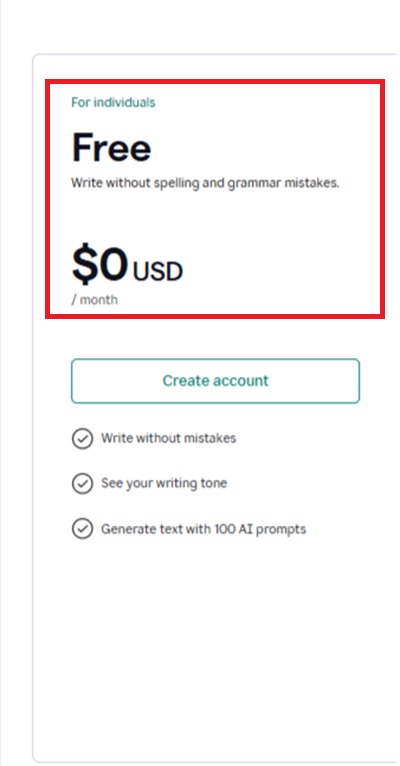
Grammarly’s free version provides all the essential features necessary for good writing.
ProWritingAid (Lifetime Plan)
ProWritingAid offers a special plan that is rare to see in other tools is its Lifetime plan. You just have to pay one time, and you get lifetime access to become a ProWritingAid member.
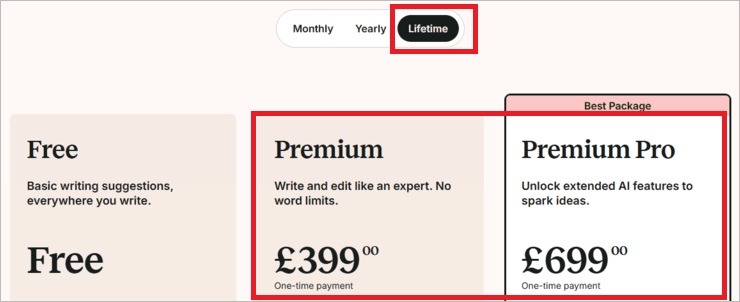
The plan it offers in the Lifetime Plan is much cheaper than any other plan. On a monthly basis, you just have to pay $399, and you get a 14-day money-back guarantee.
My Take: If you are a student or learner, the free plan of Grammarly is the best, which offers limits like unlimited. And if you are a storyteller or professional writer ProWritingAid lifetime plan is cost-effective
Based on My Experience, Which Tool is Better? (Use Case)
| Use Case | Ideal Tool |
| If you are a student- assignments, essays, documents, reports | Grammarly AI grader, grammar checker, citation |
| Long essays, story writing, research papers in in-depth analysis, such as plot, story structure, and readers’ reactions | ProWritingAid Critique, manuscript analysis, and virtual beta reader. |
| To get instant ideas, creative style writing, and various report formats | ProWritingAid Sparks, Report, and Style Guide. |
| For knowing the Readers’ reaction, analyzing subject-specific feedback, and proofreading the documents | Grammarly Reader’s reaction tool. |
Conclusion
Now that we’ve come to the end of the article, both Grammarly and ProWritingAid can be seen as alternatives to each other.
But here, Grammarly takes the lead in case you want a versatile tool that can help every profession; ProWritingAid doesn’t do it. Check out our ProwritingAid review for more details.
Because it is made specially for story writing, while Grammarly is quite versatile and diverse.
FAQs
What are the disadvantages of ProWritingAid?
The major disadvantage is that it provides a very limited free version and a 500-word limit to scan a document, which could be irritating sometimes.
Which one is better: Grammarly or ProWritingAid?
Grammarly is much better than ProWritingAid as it offers various tools that work equally for all professions. Grammarly is good for daily essential writing and short-form content, whereas ProWritingAid is for long-form content and in-depth analysis reports.
Can Grammarly Humanize AI texts?
Yes, Grammarly can humanize the AI-generated texts by using a humanizer tool.

About the Author:
Hi All, This is Renu. A Bsc. B.Ed. ex principal with over 45 years of experience. I have worked for renowned government school in India. During my tenure, I have helped in NCERT syllabus updations, written several books in english English literature.
Post my retirement, I have been teaching English Language, translations and content creations to the students across the world. Have created several typing, content writing and translation related courses on this website.
Not very active on social media but you can connect me on LinkedIn.