Nowadays, all work is related to social media and online platforms. Professionals rely on business emails, content strategies, market research reports, social media advertising, branding, product descriptions, client proposals, etc.
For all such tasks, a perfect writing tool not only prevents mistakes but also saves time. And how great it would be if all the solutions to your problems were found in one place. Yes, from AI writer to AI detector, from editing to expert review, from a basic grammar checker to AI assisted paraphraser.
I will show you in this guide how this lovely tool can save atleast $100 a year.
I'm able to tell you this because I've been in the content writing field for 10 years. Grammarly has always been my best writing tool.
Let’s find out how Grammarly is a complete suite for all professionals.
Table of Contents
What Grammarly Can Do?
As a content creator myself, I review multiple courses that we create here. We send atleast 3-4 eBooks to our community every month. For our clients we do a lot of english translation, and writing work. For me, creating content and reviewing team’s content is a big challenge.
You cannot afford to have even a single mistake in your client’s work. Editing and Proofreading can take 20-30% of daily bandwidth, if not more.
But, we have one swiss army knife here.
Grammarly is a writing tool that’s perfect for every professional to complete their project from start to finish. Each of its tools is designed to perform its functions efficiently and give your content a new and improved look.
Grammarly offers a bouquet of basic and advanced features; some are completely free with limits, and advanced features are paid.
I would say that when you look at the features and performance and compare the price, then you will realise that it is value for money.
Let’s first explore some of its basic features that will become your writing assistant.
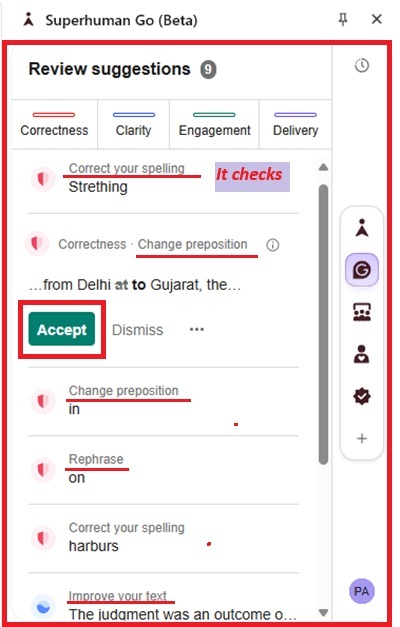
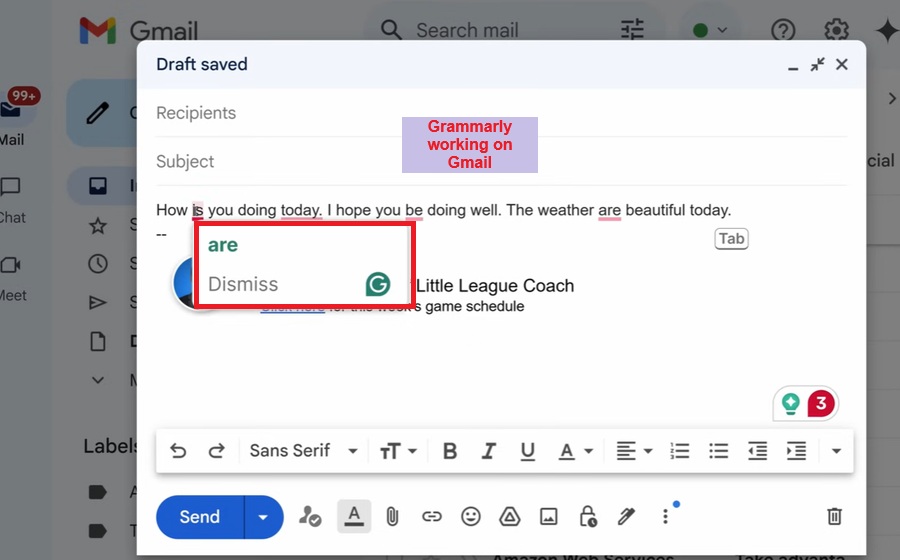
- Grammar & Spell Checker: As you can see, Grammarly not only detects spelling and grammar errors but also gives suggestions with explanations for learning purposes.
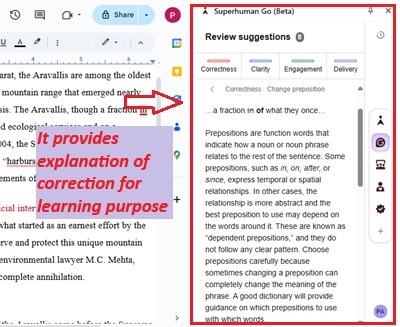
Grammarly is known for its Grammar Checker.
- Tone Detection: Grammarly’s tone detector sets the voice to whatever tone you want, such as confident, empathetic, engaging, casual, and many more.
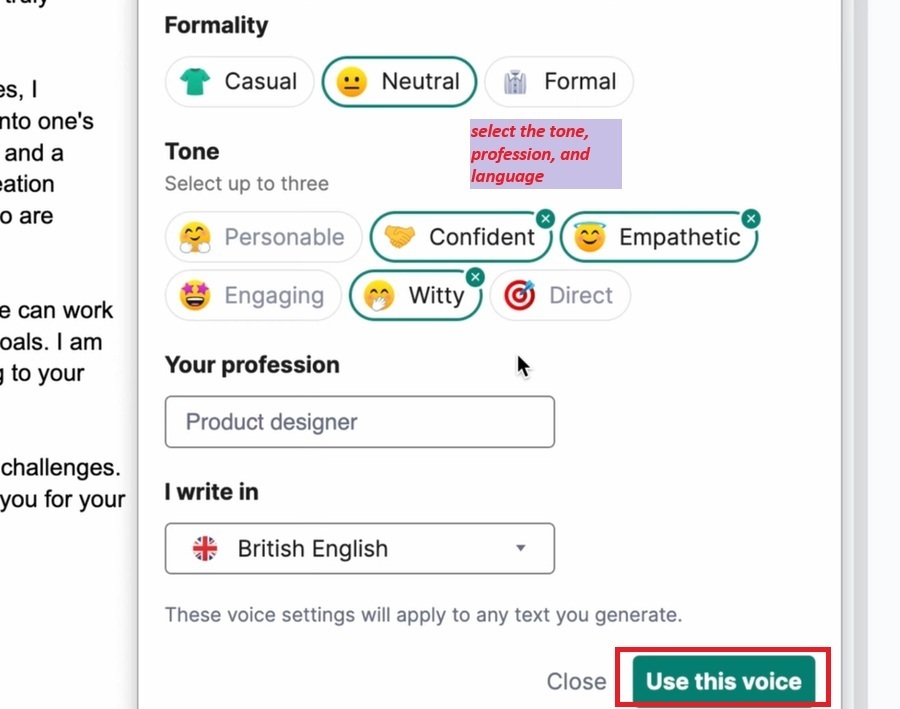
The Grammarly tone detector gives a confident pitch to your message.
- Rewrite: You can rewrite entire paragraphs with a single click. This makes your sentences sound better, which is crucial for professionals.
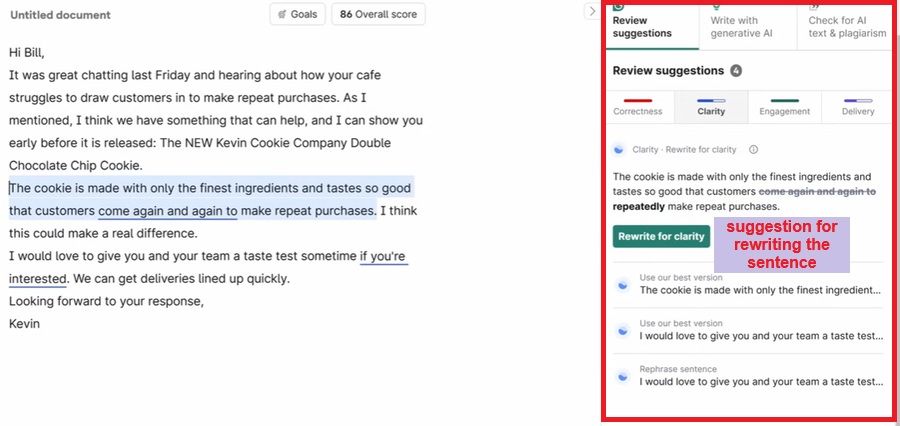
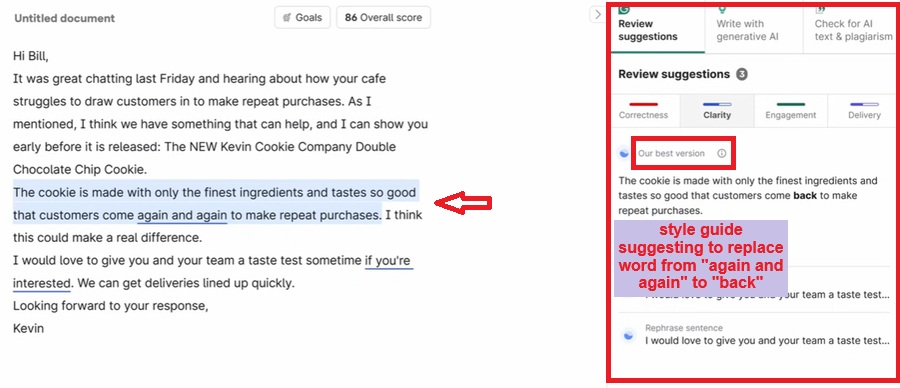
- Improves Vocabulary: I personally like this feature of Grammarly. It suggests synonyms that, when inserted, look professional.
- Style Guide: A style guide provides word correction tools that will improve your writing and grammatical rules with a click. For example, it suggests replacing the word “happy” with “glad.”
AI Tools That Grammarly Offers
So, Grammarly today is not only a static old-age grammar checker. It is updating itself frequently. Today, when everyone is hunting for AI tools and at the same time, finding it difficult to afford them, Grammarly went ahead and rolled out use case-based AI features, some for free and some with the PRO plan.
| AI Tools | Key Functions and Benefits |
| Humanizer | Sounds natural, engaging, and improves sentences without changing intent. |
| Proofreader | Mistake-free, clarity, improve spellings, correct grammar mistakes, and punctuation. |
| Paraphrser | Rewrite the sentence, clarity in understanding, no repetitive words, plagiarism-free |
| AI Detector | Detects AI-generated text, no plagiarism, proofread to edit content. |
| Plagiarism Checker | Maintain authenticity, no copied content, improves the content duplication. |
| Citation Finder | Source original sites, create citations, and clear & confirmed facts. |
| AI Grader | Clarity, grammar correction, area of improvement, and rate the performance |
Grammarly’s Use Cases For Professionals at Work
I am also a professional and have to write and review a variety of content pieces in a day. While talking to international clients, keeping their writing and grammar rules in mind is a professional practice.
English is not my native language, so I write grammatically based on US and British English, and all thanks to Grammarly that eases my work.
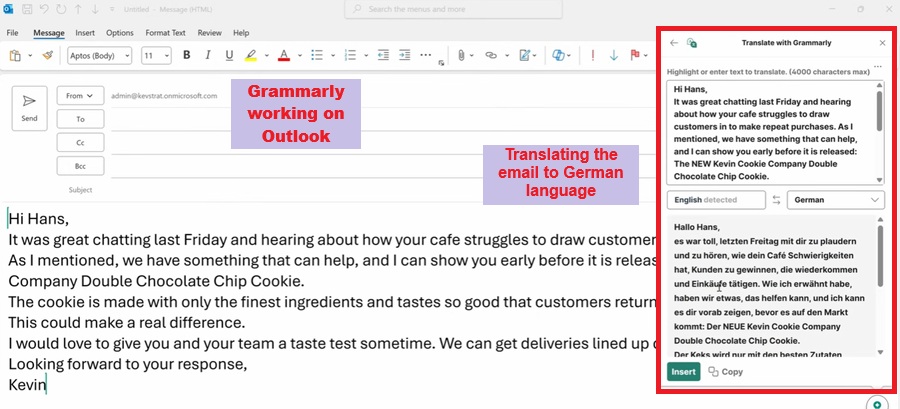
1. If you are a Digital Marketer who creates ads, marketing content, emails, and engaging social media posts, paraphrasing is the best tool to use. It offers multiple options on Gmail, allowing me to write in multiple ways on different platforms.
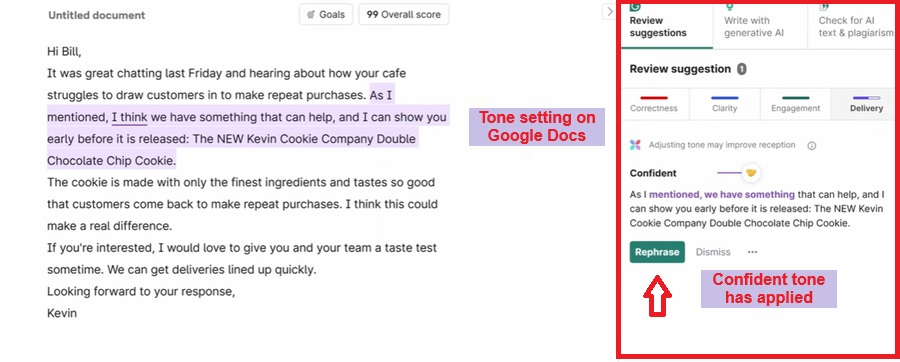
I have also set the tone in it so that by setting a confident voice, the message looks professional.
2. If you are a content strategist or a marketer who creates content strategies, brand messages, landing pages, and proposal drafts, post for marketing, the best features are AI Chat and Grammarly Go, which will reply to your email and provide heading ideas and proposal ideas when asked.
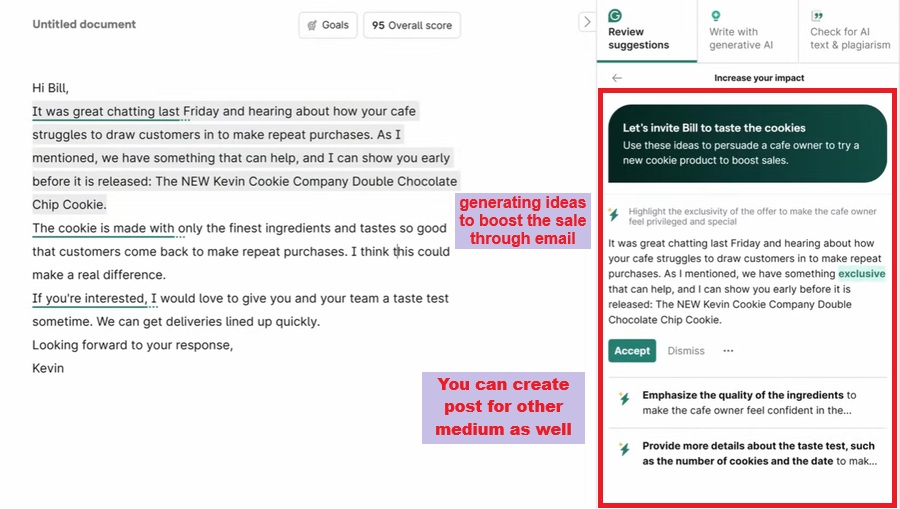
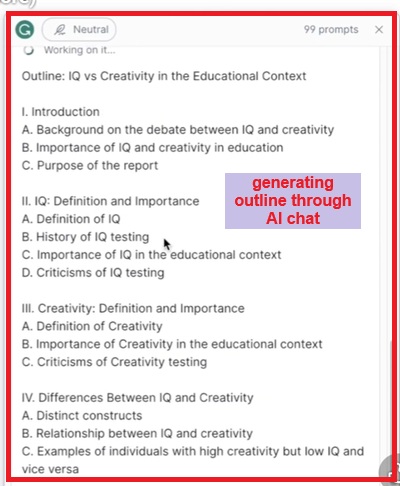
3. If you are a script writer looking for ideas to create ads, stories, or outlines, then you can again use AI Chat. It will generate ideas for outlines and write in different variations.
4. If you are a translation agency or an entrepreneur dealing with global clients, writing large-scale essays or website content, and analyzing each essay will be next to impossible, then Proofreader and Grammarly Go are the best options, as they will ensure no mistakes are left and can also summarize the content.
Pricing And Plans Offered By Grammarly
Grammarly offers a free plan and a paid plan called Grammarly Pro. It has two versions: individual and team plans.
The annual plan is $144, which costs $12 per month for both the individual and team plans. If you take the monthly plan, it costs $30, which makes it more expensive than the annual plan.
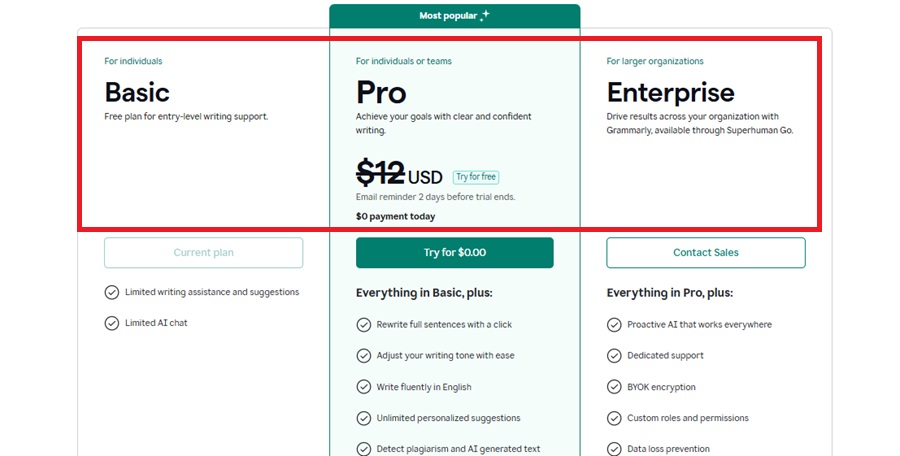
Both the individual plan and the team plan are priced the same. If you run an agency and have a team, the team plan is best for you, which costs $12/member/month if billed annually, with all the features and unlimited access.
The annual plan has always been the best for professionals. If you’re a new user, you can try the monthly plan. The free plan offers only basic features, but with unlimited limits. I wouldn’t recommend it for professionals. This is the best plan for students.
Grammarly Is Ideal for Different Professional Roles
Grammarly is not limited to just one profession but has expanded its reach to help professionals. I see that I have many clients whom I guide to Grammarly. Their feedback is ultimately positive. To simplify it for you, let me explain the usability of its features in the form of a table.
| Profession | Work by Professionals | Factors | Grammarly Tools To Be Used |
| Content Writer | Blog ideas and outlines | Improves Readability, reduces repetition of words, original content, and generates ideas | Rewrite, Rephrase, AI Chat, plagiarism checker, AI detector |
| Educator and Trainers | Emails, Reports, essays, proposals | Simplify complex topics, mistake-free documents | Proofread, Grammarly Go (summarize), AI detector |
| Customer Support Team | Response to customers, emails | Maintaining consistency, improving tone, and clarity | Grammarly Go, Tone detector |
| Marketing & Sales | Create sales copies, slogans, and campaign ideas | Generate ideas, multiple options, variations in style | Paraphrase, AI chat, style guide |
| Freelancers | Client proposals, portfolio, essay, and website contents | Tone detector, clarity, ideas, variations, original content | Paraphraser, AI Chat, Plagiarism checker |
| Journalist | Magazines, headlines | Clarity, error-free, variation in ideas, natural, and confirmed facts. | Humanizer, Citation Finder, Proofreader, AI Chat |
Expert Suggestion: How Grammarly Can Be Your Best Guide
I say “Grammarly best guide” because it doesn’t leave any platform where you can work without interruption. I installed the browser extension Grammarly works in Chrome, Firefox, Edge, Safari, and all of them. And without you even knowing, as soon as you install the browser extension, it works in the background and gives you suggestions.
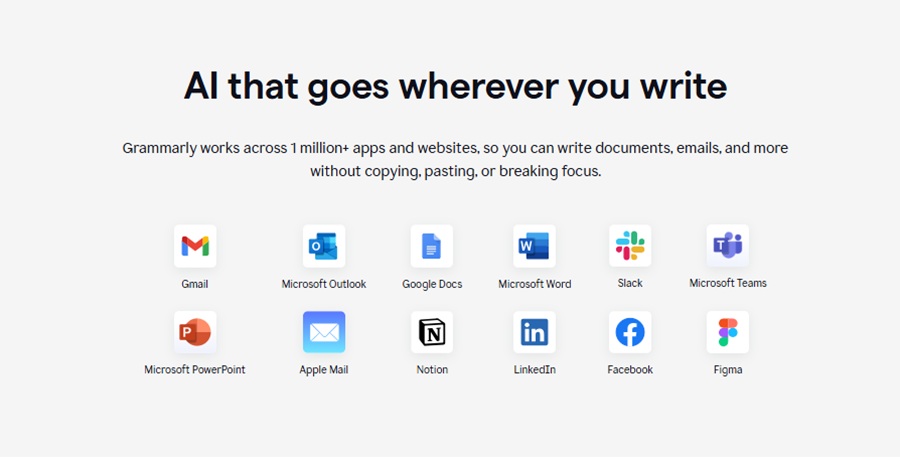
It also supports MS Word, Outlook, and Google Docs integration. If I were to say it personally, Google Docs integration is a great choice for me because it’s useful for content writers.
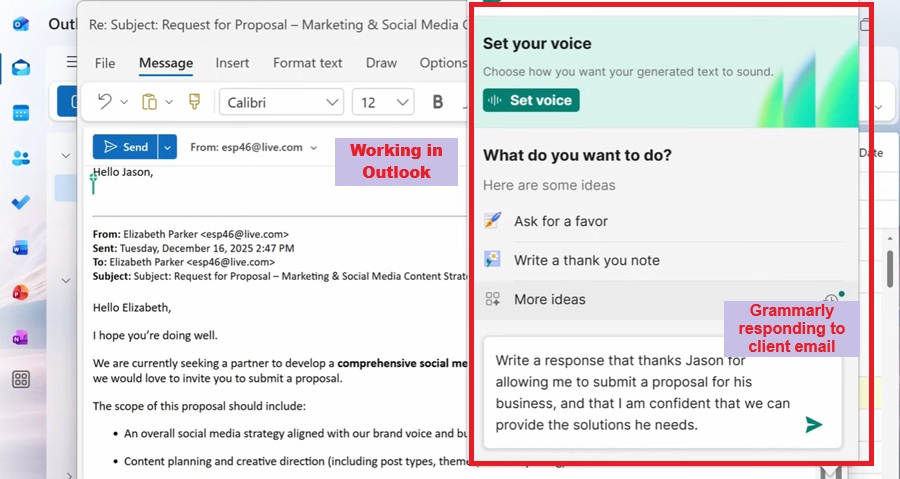
It also works with web applications like Gmail, LinkedIn, Instagram, Twitter, and Facebook, as well as apps like Facebook.
Grammarly also offers mobile support for both Android and iOS, allowing you to work simultaneously on your desktop and phone.
Pro Tip: Install the browser extension to ensure it works perfectly with all apps. It switches quickly and is also useful for uploading social media posts.
Grammarly Saves At Least $100 A Year
Grammarly has always been a value for money because it costs $144, which decreases the monthly price to $12/month, and unlocks all the features with unlimited access, including tools like a plagiarism checker and an AI detector.
Buying Grammarly means you’ve bought the full package.
If you look at Originality AI, it costs $12.95/month, and it only offers a plagiarism checker and an AI detector. Then you’ll have to buy a writing tool along with it, like ProWritingAid.
ProWritingAid doesn’t offer an AI detector. Now, if you calculate, both will cost you as the annual price is $275.4, which is quite expensive compared to Grammarly.
The plagiarism checker and AI detector are expensive to buy individually. For example:
- Originality AI- $12.95/month and $30 One time
- Copyleaks- $13.99/month
- Plagiarism Checker.ai- $20 – $ 40/month.
I can say that Grammarly gives you the full suite for this price without compromising on performance and accuracy.
That is why everyone agrees that Grammarly is the best in providing all the features on one platform with affordable pricing.
Ratings Provided To Grammarly By Various Platforms
Grammarly has received amazing ratings and reviews not only from my personal experience and my clients’ feedback, but also from global sites, which I mention in the table.
| Platforms | Ratings For Grammarly |
| G2 | 4.7 out of 5 |
| Capterra | 4.7 out of 5 |
| TrustRadius | 9.1 out of 10 |
This shows that Grammarly is the most loved AI Writing assistant.
Conclusion: Grammarly Professional Writing Tool 2026
Now that you’ve reached the end of the article, I want to tell you that I’ve used Grammarly since my early career, and I never send an email without a writing tool.
It’s affordable for the price. It’s a great AI writing assistant that offers all the tools.
The purpose of this article is to provide a genuine review based on my experience and client feedback. It follows you from desktop to mobile and supports you in every browser and application.
I hope you liked my article. Do try Grammarly, and if you have any doubts, please write in the comments section. I am available 24/7 to answer your questions.
FAQs
Which Grammar tool is best?
Speaking of grammar checker tools, Grammarly is the best and most well-known tool. It’s not just a grammar checker, it’s also an all-in-one writing assistant.
Which Grammarly plan is the best?
The Grammarly Pro plan is the best choice, but based on your requirements. The Team plan and Individual plan are priced the same, which comes to $12/month if billed annually.
Do professional writers use Grammarly?
Yes, of course, Grammarly is the best tool for professional writers and is used by renowned organizations like Upwork, Zoom, Zapier, and many more. It is capable of solving every task of professionals.
Do universities recommend Grammarly?
Yes, around 3000 universities recommend Grammarly for the work of their institutions and even provide access to students.

About the Author:
Hi All, This is Renu. A Bsc. B.Ed. ex principal with over 45 years of experience. I have worked for renowned government school in India. During my tenure, I have helped in NCERT syllabus updations, written several books in english English literature.
Post my retirement, I have been teaching English Language, translations and content creations to the students across the world. Have created several typing, content writing and translation related courses on this website.
Not very active on social media but you can connect me on LinkedIn.